Benchmarking Local LLM Servers: llama.cpp, llamafile, LM Studio, and Ollama
Benchmarking Local LLM Servers evaluates llama.cpp, llamafile, LM Studio, and Ollama across Mac, Linux, and Steam Deck. The study reveals build flags and configurations drive up to 63% performance gains, whereas underlying engines perform similarly due to a shared llama.cpp core.


Running an LLM locally is more than choosing a model. The serving tool plays an essential role, as it determines how quickly prompts are processed, how fast tokens are generated, and how easy the model is to deploy. We measured those differences across four popular local servers (llama.cpp, LM Studio, Ollama, and our own llamafile) using our exp-llama-benchy, a benchmarking tool that relies on llama-benchy to compare many servers across different platforms.
We performed our tests on a Mac Studio M4 (using Metal GPU acceleration), a Linux server with an NVIDIA L40S (CUDA), and on a Steam Deck (Vulkan). We covered three Qwen model sizes: 0.8B, 9B, and 27B (the last one skipped on the Deck due to memory constraints), and tested prompt parsing from 1,024 to 8,192 tokens and token generation with 32 or 64 token outputs.
This is not a final ranking. It is a practical snapshot of how these tools behave in three different environments, when provided the same model weights, trying to understand where each server’s “secret sauce” is.
What We Found
- The biggest speedups came from configuration, not the choice of engine. Enabling CUDA graphs in the llamafile build lifted L40S decode by 16.8% on the 0.8B model. A newer Vulkan shader toolchain raised Steam Deck prompt processing by up to 63% on the 9B model, and the best speculative-decoding draft length flipped between platforms, with draft 2 winning on Metal and draft 4 on CUDA.
- All four servers share the same core. Each serves GGUF through llama.cpp under the hood, which is why they land within a few percent on prompt processing once weights and environment are held fixed, and why the settings above matter more than which server you pick.
- Much of the decode gap is fixed host overhead, not GPU work. It's a near-constant per-token cost (about 0.4 ms on the Mac, 1.8 on the L40S, 5.4 on the Deck), so the same overhead reads as a big percentage on a fast model and a small one on a slow model.
Test Setup
We tested three environments:
Software versions, identical across all three machines: llama.cpp b10441 (commit 0177dcc73), llamafile 0.10.6 (commit 42ff11b), Ollama 0.34.0, LM Studio runtime 2.28.2 (metal / cuda12 / vulkan), llama-benchy 0.4.0.
Every runtime served the same GGUF files from lmstudio-community: llama.cpp and llamafile loaded them directly; Ollama served them through tags built from those exact files; LM Studio was pinned to the same GGUF by an explicit model key. The 0.8B tests used Q8-class artifacts, while the 9B tests used Q4_K_M quants. Each model was loaded with 16,384 tokens of context length, full GPU offload, and for the 27B model we enabled speculative decoding at draft length 2 (LM Studio's default). We deliberately kept each runtime's own batching defaults.
What we measured
The benchmark reports two throughput measurements, both in tokens per second:
- Prompt processing (PP) measures how quickly the server processes the input prompt before text generation begins.
- Token generation (TG) measures how quickly the server produces output tokens after processing the prompt.
Prompt processing matters most when working with long documents, large codebases, agents, or lengthy conversation histories. Token generation matters more for interactive chat, where users are waiting for the response to appear. The benchmark used four prompt sizes (1,024, 2,048, 4,096, and 8,192 tokens) and text generation was measured with both 32 and 64 output tokens.
Each point you’ll see in our plots is the result of 15 llama-benchy runs. The first is simply used as warm-up and then ignored; of the remaining 14, the 2 fastest and 2 slowest are discarded and the middle 10 averaged. Error bars are ±1 standard deviation over all 14 post-warm-up runs. Servers are restarted before each run, so weights and KV cache start cold, and the four servers are interleaved within each model evaluation, so a slow drift in machine state cannot favour whichever server went first.
Measurements are client-side, with one exception: LM Studio's decode on macOS is taken from the engine's own timings. The reason is that LM Studio releases its output stream in bursts on macOS, which makes client-side figures inconsistent with the server-side ones.
Linux / NVIDIA L40S
On the NVIDIA L40S, prompt processing is close. Token generation is where the servers separate:
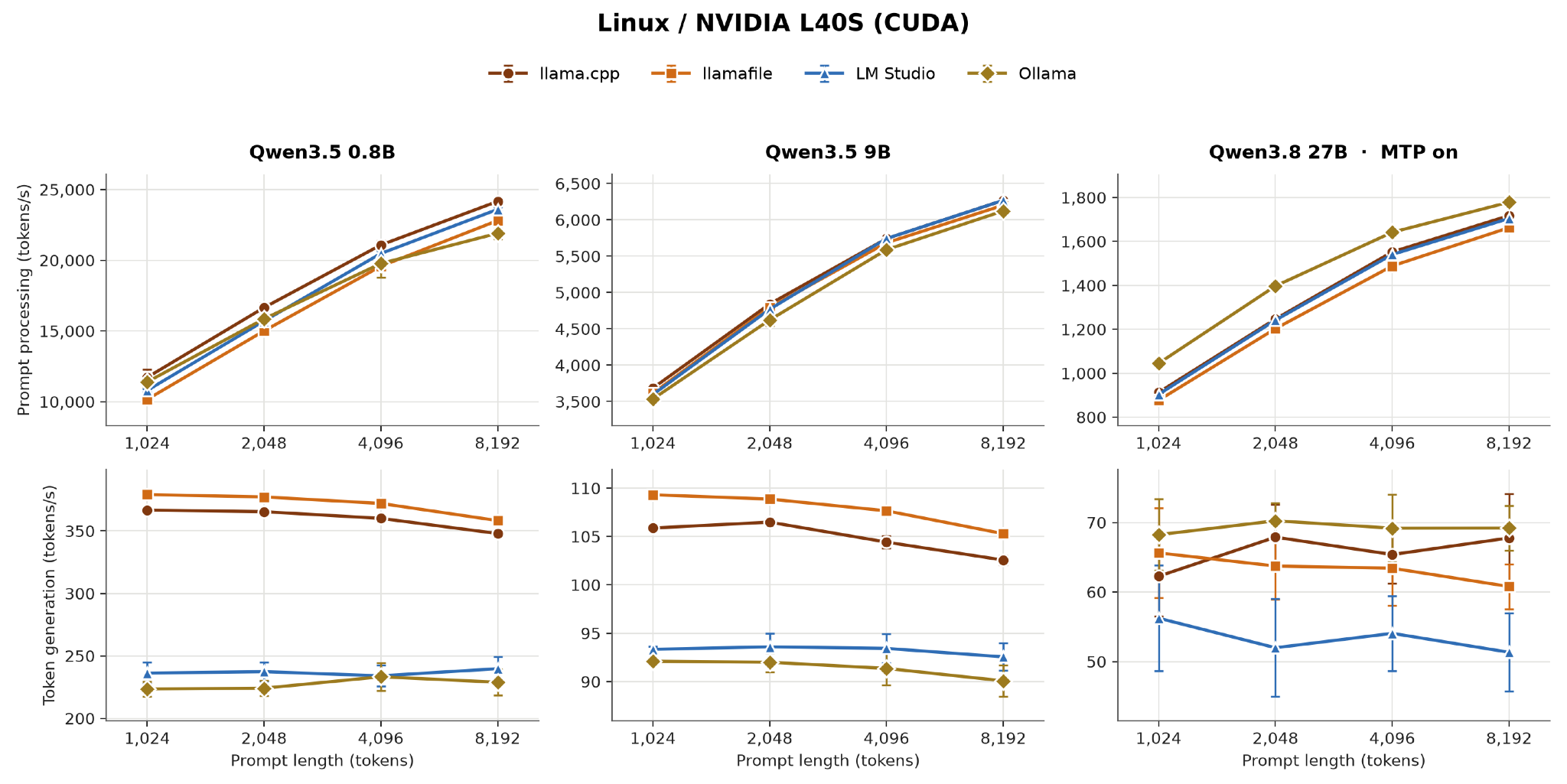
One hypothesis for this wide gap is a fixed per-token cost on the host side, not a difference in GPU work. As a percentage it looks dramatic on a fast model (67%) and modest on a slow one (18%), but we measured the spread’s absolute value in terms of ms per token and verified it is almost constant across models: about 1.8 ms on the L40S, 0.4 ms on the Mac, and 5.4 ms on the Steam Deck.
This experiment is also where a build flag beat every engine difference: prior to this, llamafile's shipped CUDA backend was compiled without CUDA graphs. Turning them on improved decoding by +16.8% on the 0.8B, +6.5% on the 9B, and +4.3% on the 27B.
Mac Studio
Prompt processing on Metal is remarkably uniform. Across all three models, llama.cpp, llamafile and Ollama sit within ±3% of each other at every prompt length. The exception is LM Studio on the smaller models, and it is very likely again a fixed cost.
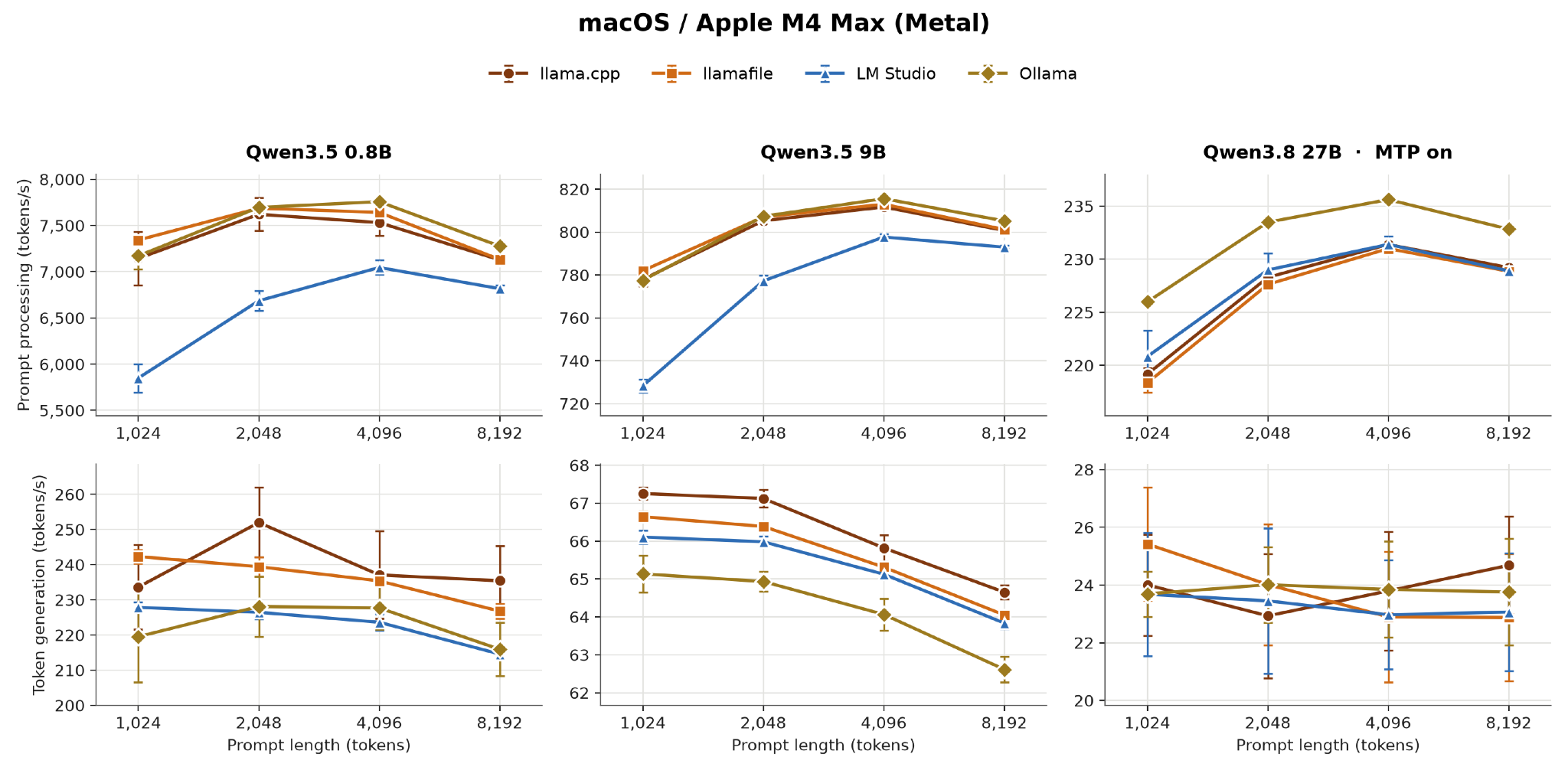
Metal is also where draft length matters most: with speculative decoding at Ollama's library default of 4 tokens, 27B decode is actually worse than no speculation at all (≈15 vs 23.4 tok/s). At draft 2 it rises to 24-25 tok/s. The same sweep on the L40S goes the other way, i.e. draft 4 beats draft 2 there by up to 16%. The conclusion is that there is no portable "best" setting.
Steam Deck
The Deck produced the largest spread of any machine, and almost all of it came from the choice of the shader compiler.
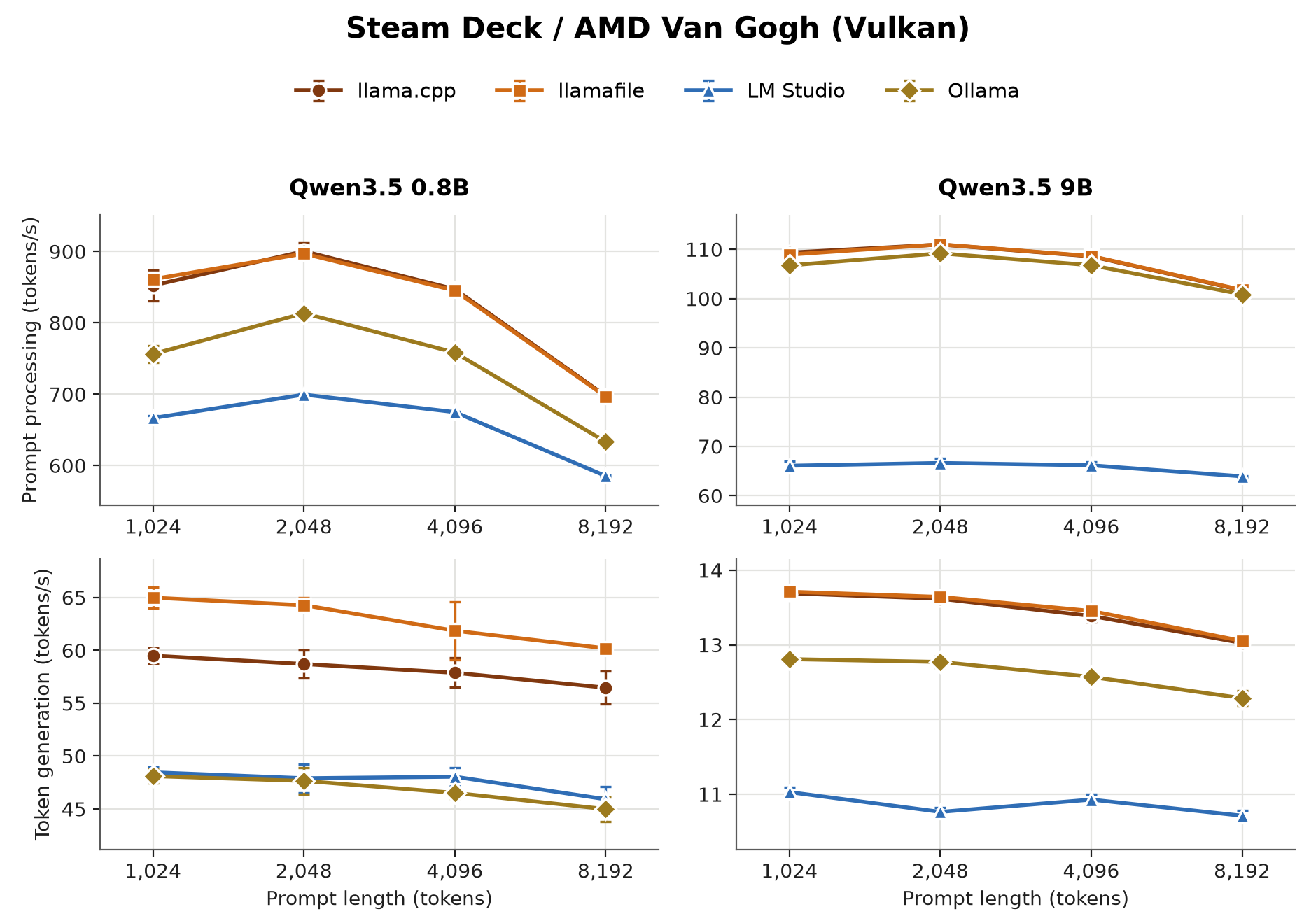
Four line charts on a Steam Deck; llama.cpp and llamafile lead on both prompt processing and generation, Ollama sits below them, and LM Studio trails, most visibly on 9B generation.
We tested this directly rather than inferring it. Building from the same llamafile/llama.cpp commit with two different versions of the Vulkan shader libraries (Ubuntu 24.04’s shaderc 2023.8 vs LunarG Vulkan SDK’s 2026.03), we managed to improve performance as follows:
- Prompt processing: +25.9% (0.8B), +63.3% (9B)
- Decode: +18.2% (9B), −0.6% (0.8B)
LM Studio's deficit in the plots is a property of its shipped runtime, not its engine, and unlike the others it cannot be fixed by the user, because the runtime arrives prebuilt.
Why the prompt-processing curves have three different shapes
When interpreting the plots, we were surprised to see that the prompt-processing curves were so different across the three environments: the throughput rises with prompt length on the L40S, rises then falls on the Mac, and mostly just falls on the Deck. It was interesting to find that these were not three behaviors, but rather three different views of the same curve.
Model prefill time as t(n) = c + a·n + b·n²: a fixed per-request cost, a linear term (the matmuls), and a quadratic term (attention). Throughput n/t(n) peaks at n* = √(c/b). Below that, the fixed cost is still amortising and throughput climbs; above it, attention takes over.
Fitting the measured 0.8B curves:
The L40S's peak is more than three times beyond the longest prompt we tested, so we only ever see the rising limb. The Deck is already 40% attention-bound at 8,192 tokens.
Each runtime's own weights: MLX on Apple silicon
Everything above holds the weights fixed, which is the fairest way to compare engines but not the way people usually run these tools. On Apple silicon, both Ollama and LM Studio ship MLX (Apple's own standard for model weights rather than GGUF) builds which are often served by default unless you explicitly choose the GGUF variant. So it only seemed fair to us to also show the largest (27B) model’s performance with each runtime on its own preferred artifact:
Prompt processing improves modestly, and by the same amount for both: +9.9% for Ollama and +10.7% for LM Studio at a 1,024-token prompt, easing to about +6% and +9% at 8,192. This is the clean part of the comparison: no confounds, and both runtimes gain roughly 10%.
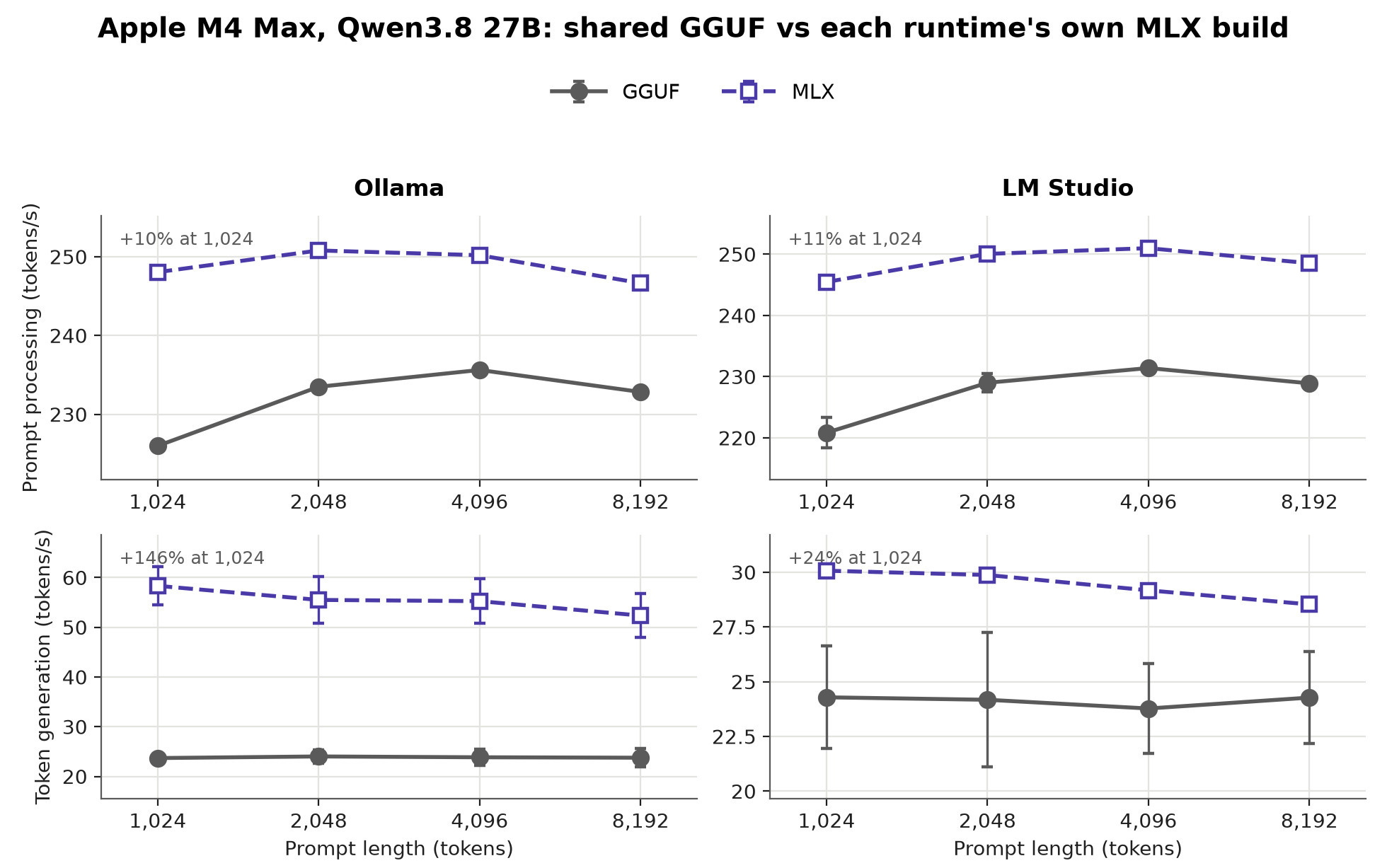
Generation is where it gets interesting, and where the two stop being comparable. The gap between those two MLX figures is not MLX: Ollama's MLX runner turns on speculative decoding by itself, with an adaptive draft depth, while LM Studio's MLX does no drafting at all.
Two caveats travel with these numbers. The artifacts are not the same weights: LM Studio's MLX build is 4-bit affine with group size 64 (15 GB), Ollama's tag reports nvfp4 (18.2 GB), and the shared GGUF is Q4_K_M (17.7 GB). And this experiment answers "how fast is each runtime at its default", not "which engine is faster". llama.cpp and llamafile are absent because neither has an MLX path, which is itself a fact worth weighing if you are choosing a tool for a Mac.
What these results mean in practice
There is no one-size-fits-all server, but the reason is more specific than "it depends". After controlling for weights, build flags, shader toolchains and background load, the four engines land within a few percent of each other on prompt processing, and most of the decode difference is a fixed host-side per-token cost. The things that moved our numbers by tens of percent were, instead, a compiler flag, a shader toolchain, and a speculative-decoding setting.
Our practical advice is not "benchmark every server". Overall, it boils down to the following suggestions:
- Check how your server was built, not just which one it is. The same engine compiled two ways differed by 1.6× on the Deck.
- Match the speculative-decoding setting to the platform, because the best value flips between Metal and CUDA.
- Watch what else is running on your machine if you care about your model’s performance.
- Separate prompt processing from generation, and look at the prompt lengths you actually use.
And as always, make your own choice depending on the task you need to solve: for long-document summarization, prompt processing may dominate total latency; for chat or code completion, token generation will usually be more visible. Benchmark the model and server combination just on the hardware that resembles your deployment environment, and keep in mind that a result from a different setup may not predict your experience.
Performance starts with availability
We also tried all four tools on a roughly ten-year-old Intel MacBook Pro. Only llama.cpp and llamafile ran successfully on its installed macOS. The current Ollama distribution did not support its installed macOS version, although Ollama documents a build-from-source path for Intel Macs. LM Studio’s current macOS release supports Apple Silicon but not Intel Macs. (Ollama development guide, LM Studio requirements)
This was a compatibility check, not a comparable performance run, so it is not included in the throughput results. It nevertheless highlights another relevant distinction: llama.cpp and llamafile retain a CPU path that can keep older hardware useful when newer, GPU-oriented applications are unavailable.
Limitations
These results compare practical setups rather than perfectly controlled backend implementations, so they come with a few caveats.
The reported numbers are trimmed. Each point is the mean of the middle 10 of 14 post-warmup runs, with the 2 fastest and 2 slowest dropped; error bars are the standard deviation over all 14. Trimming steadies the central estimate but hides the tails, so the plots understate the occasional outlier.
Timing is client-side, with one exception. LM Studio's decode on macOS is measured from the engine's own timings, because it releases output in bursts there and client-side figures don't match the server. That one series is therefore not measured the same way as the others.
The benchmark measures throughput after the server is running. It does not yet measure time to first token, end-to-end latency, model-loading time, memory use, power consumption, or concurrent requests. Those factors may change the practical ranking.
The high variance in several LM Studio and Ollama configurations also deserves further investigation. In particular, short and long generation tests sometimes produced different rates on the L40S, while llama.cpp and llamafile remained comparatively stable.
What comes next
The next round should include Windows and additional macOS and Linux hardware. We also want to expand the measurements beyond throughput, including metrics such as time to first token, model load and startup time, memory and power consumption.
Finally, these tests cover only the Qwen family. Results from Llama, Gemma, Mistral, and mixture-of-experts models will help distinguish general server behavior from model-specific effects.
Conclusion
The clearest result of this benchmark is also the least glamorous. All servers are built, one way or another, on top of llama.cpp, so an engine can lead only when it brings ad-hoc optimizations for a specific platform or model (as llamafile did for CPU inference, MLX does for Metal, or ds4 does for few ad-hoc models). Aside from that, what moved our numbers by tens of percent was configuration: a compiler flag, a shader toolchain, a speculative-decoding setting.
The broader conclusion matters more than any individual win: local LLM performance depends on model, workload, and platform. A useful comparison must separate prompt processing from token generation, report variance, document the environment, and resist collapsing the result into one score. It should focus less on what engine performs best, and try answering why that happens.
The exp-llama-benchy tool provides a foundation for repeating these tests and extending them to more hardware, models, and operating systems.
The Moz AI team benchmarked four local LLM servers, llama.cpp, llamafile, LM Studio, and Ollama, across a Mac, a Steam Deck, and an NVIDIA box, to find out which one's fastest.
Turns out that's the wrong question to ask in the first place. Once they held the model and the machine steady, all four servers landed within a few percent of each other, because under the hood they're all running the same llama.cpp core.
What actually moved the numbers wasn't the server pick. It was how it was built. One compiler flag we'd left off in llamafile was costing us seventeen percent. A newer graphics toolchain on the Steam Deck bought us sixty percent. Same code, different build, huge swing.
The takeaway for anyone running models locally: stop agonizing over which tool, and start checking how it was compiled. Full data, all three machines, and the fix we shipped are in the post. Link's below.
 mozilla-ai